Configure the Envelope
You can configure a newly created envelope, or you can edit / enhance an existing envelope that has not yet been sent for signing.
See Create an Envelope to learn how to start a new envelope.
- Launch TrueSign. The Home page is displayed.
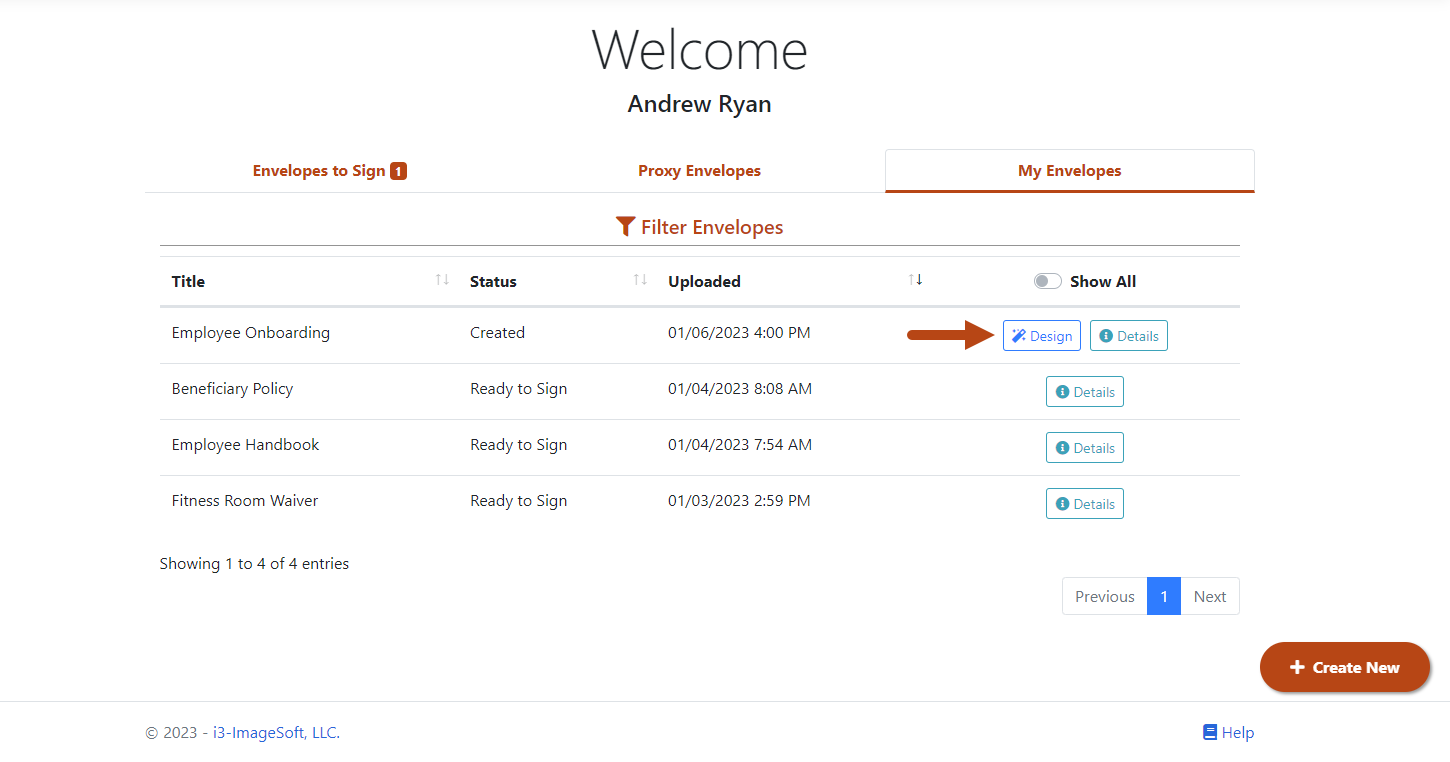
- Click the My Envelopes tab. Existing envelopes are listed.
By default, only envelopes whose status is Created or Ready to Sign are listed. To also see completed envelopes, switch the Show All toggle.
- Locate the envelope to configure.
By default, the envelopes are listed by Uploaded date - newest to oldest. You can sort based on any column by clicking the column header. The small arrow icons indicate which column the sort is based on, as well as if the information is displayed in ascending or descending order.
- Click the Design button. This button is available only for envelopes that have not been sent for signing.
The Designer interface is launched. The first document in the envelope is shown in the Document Viewer.
In Designer, you can configure the envelope properties, which include:
Signer Permissions and Reminders
Once the envelope is configured, you can:
Select Continue Later to save your configuration. To continue, you'll access the envelope from the My Envelopes tab on the Home page by clicking the Design button.
Select Delete to delete the envelope. Once confirmed, this action is permanent; you cannot recover the envelope once it's deleted.
Click Send to Sign to send the envelopes to the specified signers. See Send your Envelope for Signature to learn more.